Diwali Engagement Playbook is now


Switching to a central MarTech platform does not mean you must rip and replace the specialized tools your team relies on daily. If audited and configured correctly, a new platform acts as a central hub that enhances, rather than breaks, your existing workflows and data pipelines. To see how this technical phase fits into your broader strategy, read our comprehensive Martech migration guide.
The ‘Rip and Replace’ Myth: Why Your Specialized Tools Are Safe
Yes, your existing stack will still work. Modern unified platforms are built to act as central data hubs through native integrations and robust REST APIs, meaning you keep your specialized tools while upgrading how they connect. Careful API auditing guarantees zero downtime and continuous data flow.
Marketing operations leaders often face severe pressure when consolidating tools. The primary fear is that transitioning to a unified platform forces the abandonment of highly specialized software that currently drives revenue. This anxiety is completely unfounded if the integration architecture is planned properly.
The architecture of a modern, integration-ready stack relies on connectivity rather than isolated software inventory. Modern Customer Data Platforms (CDPs) and marketing automation hubs are engineered to act as routing systems, not isolated silos. They ingest data from your legacy systems, process it securely, and push it back out, securing outcomes without disrupting established workflows.
The Architecture of a Modern, Integration-Ready MarTech Stack
An integration-ready architecture is defined by its ability to pass standardized data structures securely across multiple nodes in real-time. This eliminates the technical debt caused by point-to-point, hardcoded integrations that inevitably break during platform migrations. Standardized webhooks and bi-directional data syncing ensure that a central unified platform commands the stack without overwriting localized tool functions.
Moving to this model significantly reduces the latency in data transfer between your CRM, specialized analytics tools, and messaging execution layers. It standardizes identity resolution across all channels, matching anonymous user data to known profiles autonomously. By centralizing the data logic, your specialized execution tools actually perform better because they receive cleaner, deduplicated data inputs.
Defining Your MarTech Stack: Beyond Just a List of Tools
A true marketing technology stack is not a software inventory spreadsheet; it is a mapped network of data flows, event triggers, and API call limits. During procurement, technical marketers must evaluate how disparate data models map to the new central platform’s schema. Ignoring this structural reality is exactly why many companies suffer data loss or reporting blackouts during a switch.
Understanding your stack requires documenting the exact data payloads being passed between tools. Differences in event tracking nomenclature or outdated deprecated connectors will instantly stall a migration. Operations teams must categorize tools by their dependency on the central identity graph to ensure no critical revenue-generating workflows are disconnected during the transition.
How to Audit Your Existing Tools for API and Integration Readiness
To prevent catastrophic data loss or downtime during a transition, you must objectively evaluate how your current tools communicate. Prioritizing API-first approaches and headless integrations is critical for extending the potential of your existing toolsets. Rely on technical integration standards rather than vendor promises.
| Integration Type | Configuration Effort | Best Used For |
| Native Integrations | Low (OAuth or API Key) | Standard CRM syncs, popular ad networks, and common analytics platforms. |
| Custom API Connections | High (Developer Required) | Proprietary databases, legacy on-premise software, complex bi-directional syncs. |
| Webhooks | Medium (Payload Mapping) | Real-time event triggering, lightweight one-way data routing. |
Integrations typically fail after migration because APIs change, different platforms use conflicting data models, or identity resolution protocols clash. Use the following structured framework to audit your stack before signing a contract:
Steps to audit your stack
- Map endpoints and authentication
Document every API endpoint your current stack hits. Identify whether they use basic authentication, OAuth, or static API keys.
2. Evaluate API rate limits
Review the API call limits of your legacy tools. Ensure the new central platform’s data sync volume will not trigger throttling or API blockages.
3. Audit data payload structures
Compare the JSON payloads sent by your current tools against the new platform’s required schema. Plan for data transformation middleware if they do not align naturally.
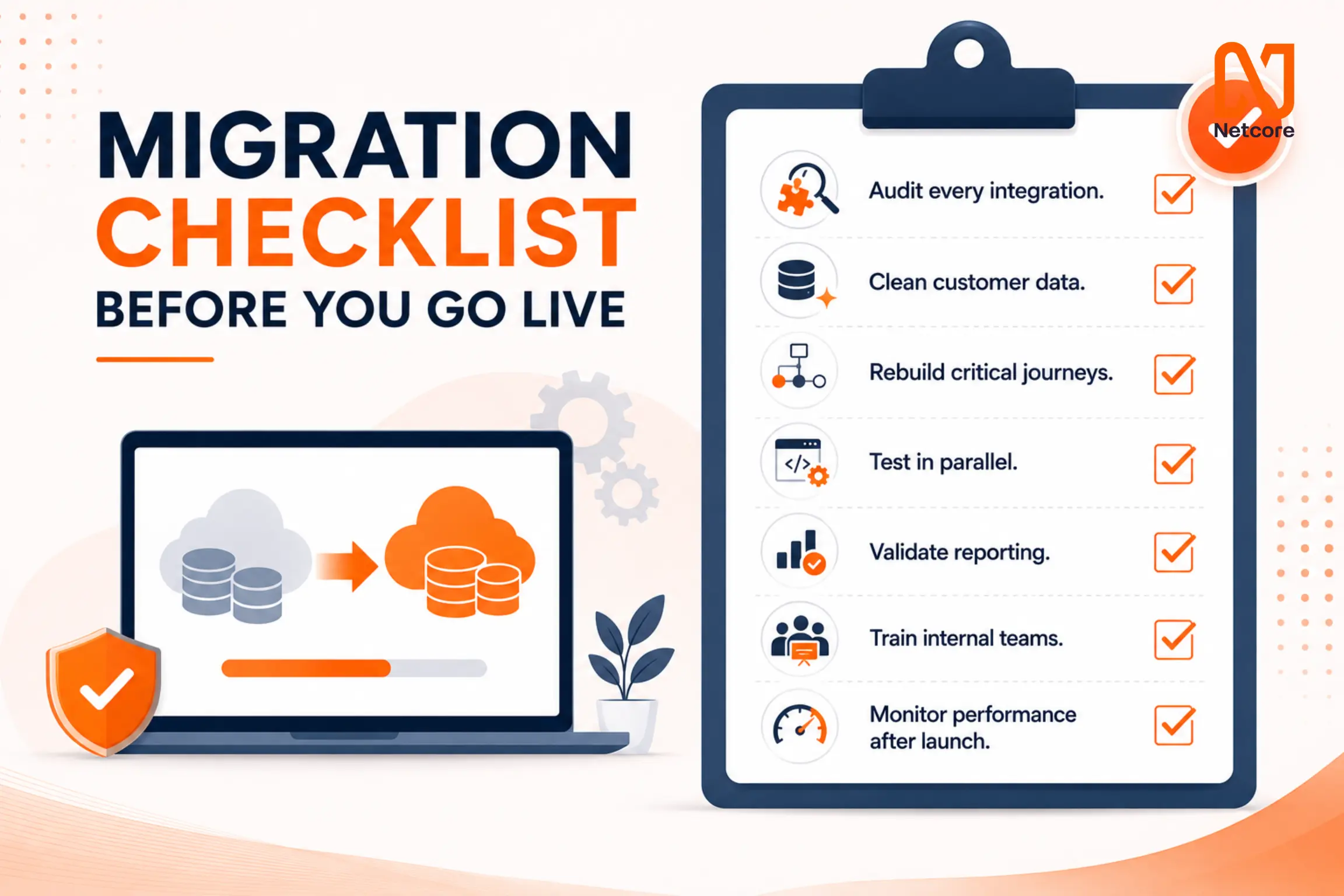
Migration Checklist Before You Go Live
Executing a zero-downtime migration requires strict adherence to a pre-launch protocol. Running the new platform in parallel with your legacy system allows you to validate data routing without risking active customer journeys. Use this checklist to verify structural readiness before redirecting live traffic:
Audit every integration: Confirm native connectors are authorized, and custom APIs return successful HTTP 200 responses.
Clean customer data: Deduplicate records and standardize naming conventions before the initial historical sync.
Rebuild critical journeys: Map out top-revenue automation workflows in the new platform and test trigger logic.
Test in parallel: Run dummy data through both systems simultaneously to identify discrepancies in identity resolution.
Validate reporting: Ensure attribution modeling and ROI tracking align with your established baseline metrics.
Train internal teams: Restrict administrative access until technical marketers complete workflow certification.
Monitor performance after launch: Set up automated alerts for API timeouts, webhook failures, or data sync errors during the first 72 hours.
If you already have a trusted Martech partner providing full migration support and onboarding, then all the above prerequisites will already be taken care of.
Final Take
Switching to a unified MarTech platform doesn’t mean abandoning your specialized tools; it means upgrading the central nervous system that connects them. By conducting a rigorous API and integration audit before the migration, marketing operations can ensure zero downtime, prevent data loss, and actually enhance the functionality of their existing stack.
Ready to optimize your new workflows? Migrate to Netcore, book your consultation today.