



Imagine a customer who buys the same brand of eggs every week. One Tuesday morning, they open the refrigerator and find just two eggs left. They meant to buy another carton yesterday, but the day got busy. Now they need eggs immediately, so they pick up another brand from the convenience store around the corner.
The brand lost a sale it could have retained, not because the customer preferred another product, but because the reminder came too late or never arrived.
This happens across grocery staples, pet food, personal care, baby products, and other everyday consumables. Customers already know what they like and have reasons to buy again. The opportunity lies in reaching them when they’re likely to need the product, before they run out or choose an alternative.
Turn First-Time Buyers into Repeat Customers and Grow Revenue
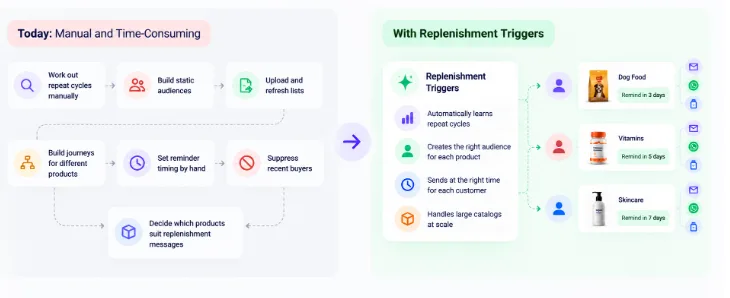
Turning an initial purchase into a repeat habit requires more than sending another promotional message. Marketers need to anticipate when customers may be ready to buy again and make it easy for them to return.
Doing this manually becomes increasingly difficult as product catalogs grow and replenishment patterns vary. Replenishment Triggers helps automate this process, so brands can focus on driving repeat purchases rather than managing reorder schedules product by product.
Don’t Let Missed Reorders Cost You Revenue
Traditional repeat-purchase programs require marketers to manage reorder timing, customer audiences, and product eligibility across multiple product lines. Three challenges make this particularly difficult:
Marketers Must Manually Work Out When Customers Need to Reorder: Identifying repeat-purchase patterns and setting reminder schedules takes time, especially when products have different replenishment cycles.
Managing Campaigns Across Large Catalogs Takes Too Much Work: Building audiences, refreshing customer lists, and coordinating product-specific journeys creates significant operational overhead as catalogs expand.
Keeping Reorder Reminders Relevant to Each Customer: Recent purchases, product availability, and limited purchase history can all affect whether a reminder should be sent and when it should reach the customer.
The answer isn’t to send more reminders. It’s to identify the right reorder window, account for product eligibility, and reach customers when they’re most likely to need a product again.
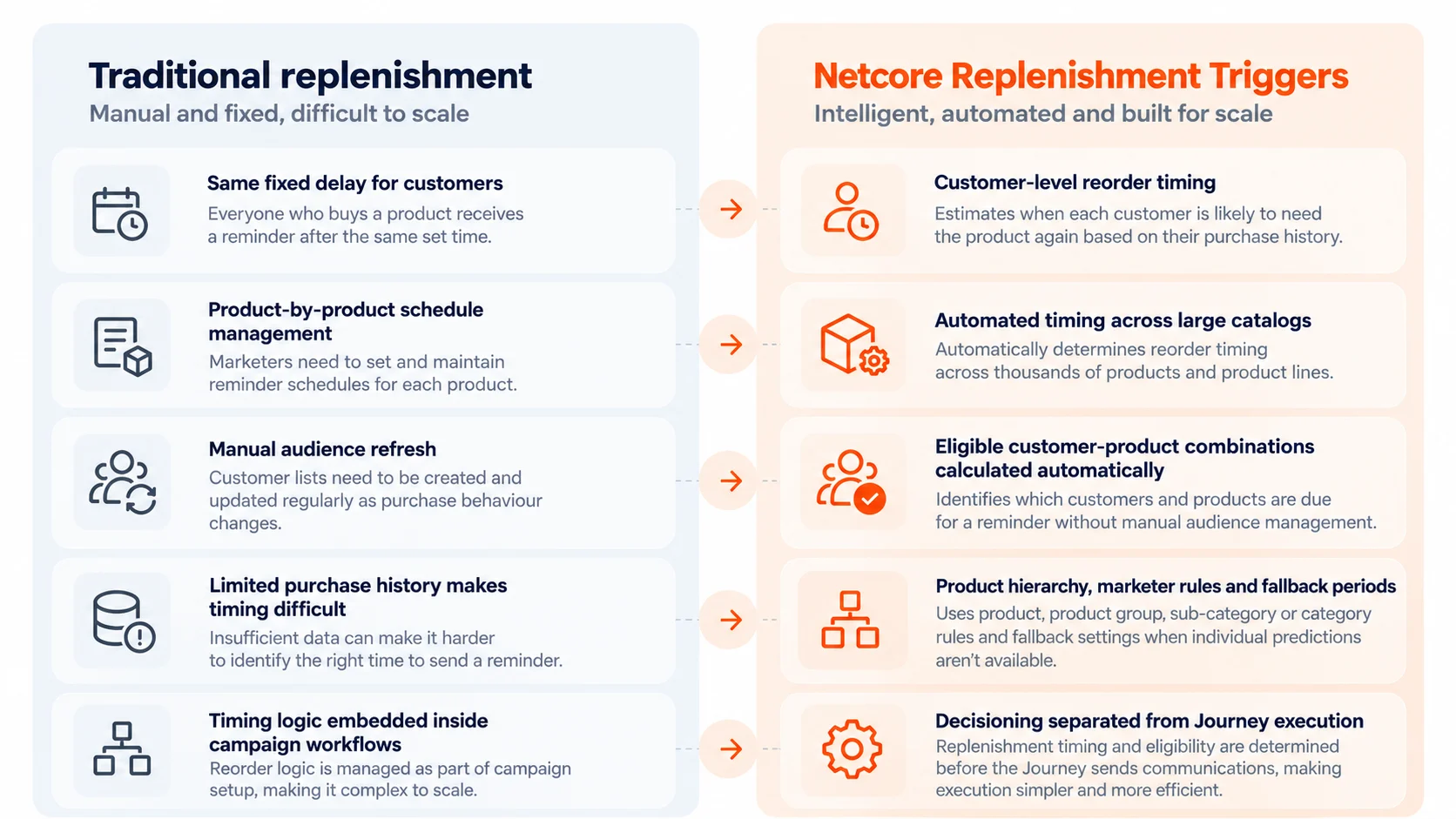
Fixed Schedules vs. Netcore Replenishment Triggers
Know When Each Customer Is Ready to Reorder
Powered by Netcore’s Decisioning Engine, Replenishment Triggers predicts the next order by analyzing customer purchase behaviour and Product Catalog data to estimate when each customer is likely to need a product again. This helps brands move beyond fixed reminder schedules and deliver replenishment reminders based on individual customer needs.
When individual predictions are unavailable due to limited purchase history, configured rules and fallback periods help determine when a reminder should be triggered. Eligible customer-product combinations are then passed into a Journey, where marketers can automate reminders through Email or WhatsApp without manually calculating reorder timing for every customer and SKU.
The feature also accommodates different replenishment needs across product variants, product groups, sub-categories, and categories. Marketers can configure rules at these catalog levels, use a global fallback when a more specific prediction or rule is unavailable, and decide when configured rules should take priority over customer-level predictions. This provides flexibility across diverse product lines without requiring a separate fixed schedule for every customer and product.
Avoid Sending Reminders Customers No Longer Need
A well-timed reminder loses its value if the customer has already purchased the product. Sending another nudge after a qualifying purchase can create unnecessary noise and weaken the customer experience.
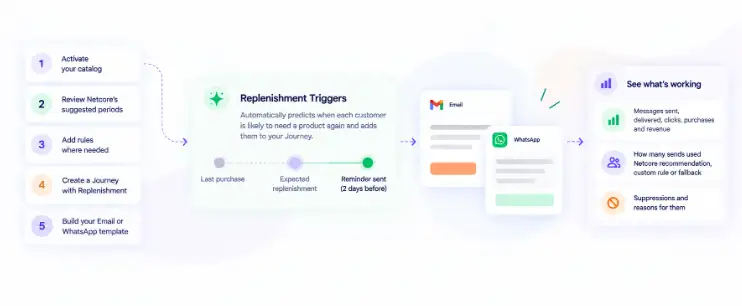
Replenishment Triggers checks for qualifying purchases before communication and validates product activity and availability where supported. Reminders that no longer meet eligibility criteria are automatically suppressed. Existing Journey frequency caps and consent settings continue to apply, helping marketers keep communications relevant and responsible.
Once timing and eligibility are determined, marketers can activate reminders through two supported channels:
- Email: Include up to nine eligible products in a single dynamic Product Block when multiple products are due for replenishment around the same time.
- WhatsApp: Send a timely reminder featuring one replenishment product per communication.
Replenishment Triggers determine timing and eligibility outside the Journey, while the Journey handles message execution. This separates replenishment decision-making from communication delivery and reduces the need for manual scheduling by campaign operations teams.
Built for Products Customers Buy Again and Again
Replenishment Triggers is designed for consumer brands selling products customers need to purchase repeatedly. Here’s how different businesses can use it to encourage timely repeat purchases.
- Grocery & Household Essentials Brand (Help Customers Restock Everyday Essentials Before They Run Out):
A grocery brand sells essentials such as rice, cooking oil, and household staples. Since customers consume these products at different rates, a fixed reminder schedule may reach some too early and others too late. Replenishment Triggers uses available purchase behaviour and Product Catalog data to estimate when customers may need to restock, helping marketers automate reminders around individual replenishment needs. - Pet Food & Supplies Brand (Bring Pet Owners Back When Their Supplies May Be Running Low):
Pet owners regularly replenish food, treats, and other consumables. A reminder that arrives too late can mean a missed repeat purchase. By estimating replenishment timing from available customer and product data, brands can reach customers when they may be ready to restock. Applicable rules and fallback settings help determine timing when individual predictions aren’t available. - Beauty & Personal Care Brand (Make Product Reorder Reminders Relevant to Each Customer’s Buying Pattern):
A beauty brand sells products such as shampoo, moisturizers, cleansers, and skincare essentials. These products have different replenishment cycles, and customers may repurchase the same product at different intervals. Netcore.ai calculates timing using available customer behaviour and Product Catalog data, with predictions at the individual customer level where sufficient data exists. Marketers can also configure rules for specific products and categories, allowing different products to follow appropriate replenishment schedules. - Beauty & Personal Care Brand (Make Product Reorder Reminders Relevant to Each Customer’s Buying Pattern):
Products such as shampoo, moisturizers, and cleansers have different replenishment cycles. Even customers buying the same product may need to restock at different intervals. Replenishment Triggers estimates timing using available customer behaviour and Product Catalog data, while configurable product and category rules help marketers accommodate different replenishment needs. - Large Consumer Brand with a Diverse Product Catalog (Automate Repeat-Purchase Campaigns Without Managing Every Product Manually):
Brands managing thousands of products often face varying replenishment cycles, purchase histories, and product eligibility conditions. Replenishment Triggers calculates eligible customer-product combinations outside the Journey and passes the relevant product context for execution. Marketers can apply product filters and configure rules while using available predictions and fallback settings to manage replenishment across the catalog. - Baby Products & Consumables: Brands selling diapers, wipes, and other everyday essentials can remind busy parents to restock before supplies run low. The same approach can support recurring purchases across other eligible consumable product lines, helping brands stay relevant between transactions.
Convert Every Reorder Window into Predictable Repeat Revenue
Customers don’t always stop buying because they’ve lost interest in a product. Sometimes they forget, run out unexpectedly, or choose a more convenient alternative. Reaching them at the right time creates an opportunity to win the next order and strengthen repeat-purchase behaviour.
Powered by Netcore’s Decisioning Engine, Replenishment Triggers helps brands estimate next-order timing using customer purchase behaviour and Product Catalog data. By combining predictions with configurable rules, fallback periods, and pre-send eligibility checks, it automates replenishment reminders across Email and WhatsApp while reducing the manual effort of managing reorder schedules across large catalogs.
Want to make repeat-purchase programs easier to manage and scale? Talk to your Netcore.ai team to see Replenishment Triggers in action.


