




Think about the last campaign you built. You pulled your latest data, wrote the message, and hit schedule. But between “schedule” and “delivered,” time passes — sometimes hours, sometimes days. And a lot can change in that window:
- A product you featured just sold out
- A customer’s loyalty points went from 1,200 to 1,700 over the weekend
- A subscription that had 14 days left now has 2
- A customer you tagged “active” has gone quiet
By the time your email lands, it’s already out of date. The personalization is there — first name, maybe a product recommendation — but the numbers behind it belong to yesterday.
Content Fetch fixes this. Instead of locking in data when you build the campaign, it grabs fresh data the instant each message is about to land in someone’s inbox. So every single recipient gets a message built on facts that are true right now — not facts that were true when you hit “schedule”.
How It Works (No Engineering Degree Required)
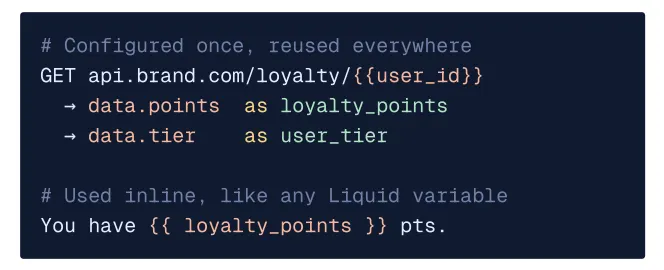
Here’s the simple version: when a message is about to go out to a customer, Content Fetch quickly checks in with your data source — your inventory system, your loyalty platform, whatever you connect — grabs the latest numbers, and drops them straight into the email before it sends.
Setting it up takes three steps:
- Tell it where to look — point Content Fetch to the data source (like your Shopify store or loyalty platform)
- Tell it what to grab — match up the data (price, points, stock status) to spots in your template
- Use it in your content — anywhere you’d normally type a static number, drop in the live version instead
Once it’s set up, it just runs — automatically, for every recipient, every send. No spreadsheets to refresh. No last-minute data pulls before a big campaign goes out.
What Kind of Data Can You Pull In?

If a system can talk to the internet, Content Fetch can probably connect to it. Here’s where marketers get the most value:
🛒 Live Pricing and Stock (Shopify & Other Commerce Platforms)
Nothing kills trust faster than a “flash sale” email showing a price that’s no longer valid, or recommending a product that’s already sold out. With Content Fetch:
- The price shown is the price they’ll actually pay if they click now
- “In stock” actually means in stock, right now
- Cart reminder emails show what’s really sitting in their cart
🎁 Loyalty Points and Membership Tiers
Point balances move constantly. Tiers shift the moment someone crosses a threshold. These are also the exact numbers customers care about most — and the ones that go stale fastest.
- “You have 1,847 points” is the real number when they open the email
- Tier-based offers match their current tier, not last week’s
- Milestone celebration emails (“You just hit Gold status!”) fire at the right moment, not days late
🌦️ Weather and Location
A rainy-day umbrella promo sent during a heatwave doesn’t just miss — it makes your brand look out of touch. Content Fetch can pull current weather or location data so the offer actually matches what’s happening outside your customer’s window, without you having to build a separate campaign for every city.
🔧 Your Own Systems
Billing dates, renewal reminders, usage stats, appointment times, order status — if your team has an internal system with an API, you can plug it in. Basically: if it has a door, Content Fetch can knock on it.
“But What If the Data Source Goes Down?”
Good question — and one worth asking, because pulling live data does add a moving piece. The good news: Content Fetch is built to fail gracefully, so a hiccup on the data side never becomes a hiccup on your send.
| Safety Net | What It Means for You |
| 1-second timeout | If a data source is slow to respond, Content Fetch stops waiting and uses a backup value instead — your email still goes out on time. |
| Automatic retries | Minor glitches get a couple of quick second tries before falling back — most hiccups never even reach you. |
| Auto-pause on repeated failures | If a data source keeps failing, Content Fetch stops pinging it and quietly uses cached or backup content until it’s healthy again. |
Bottom line: when your systems are running smoothly, your campaigns feel truly live. If something hiccups, your campaign still goes out looking normal — no delays, no broken emails, no scramble.
Real Example: Hungry Hub
Hungry Hub, a restaurant discovery and booking platform, had a classic problem: their email recommendations needed to show dishes that were actually bookable right now — not whatever was on the menu when the campaign was built two days earlier.
By connecting their menu and availability data through Content Fetch:
- Customers only see dishes they can actually book at that moment
- The price in the email matches the price they’d see on the site
- Recommendations refresh automatically with every send — no one on the team has to manually update them
Content Fetch + Liquid Tags: Better Together
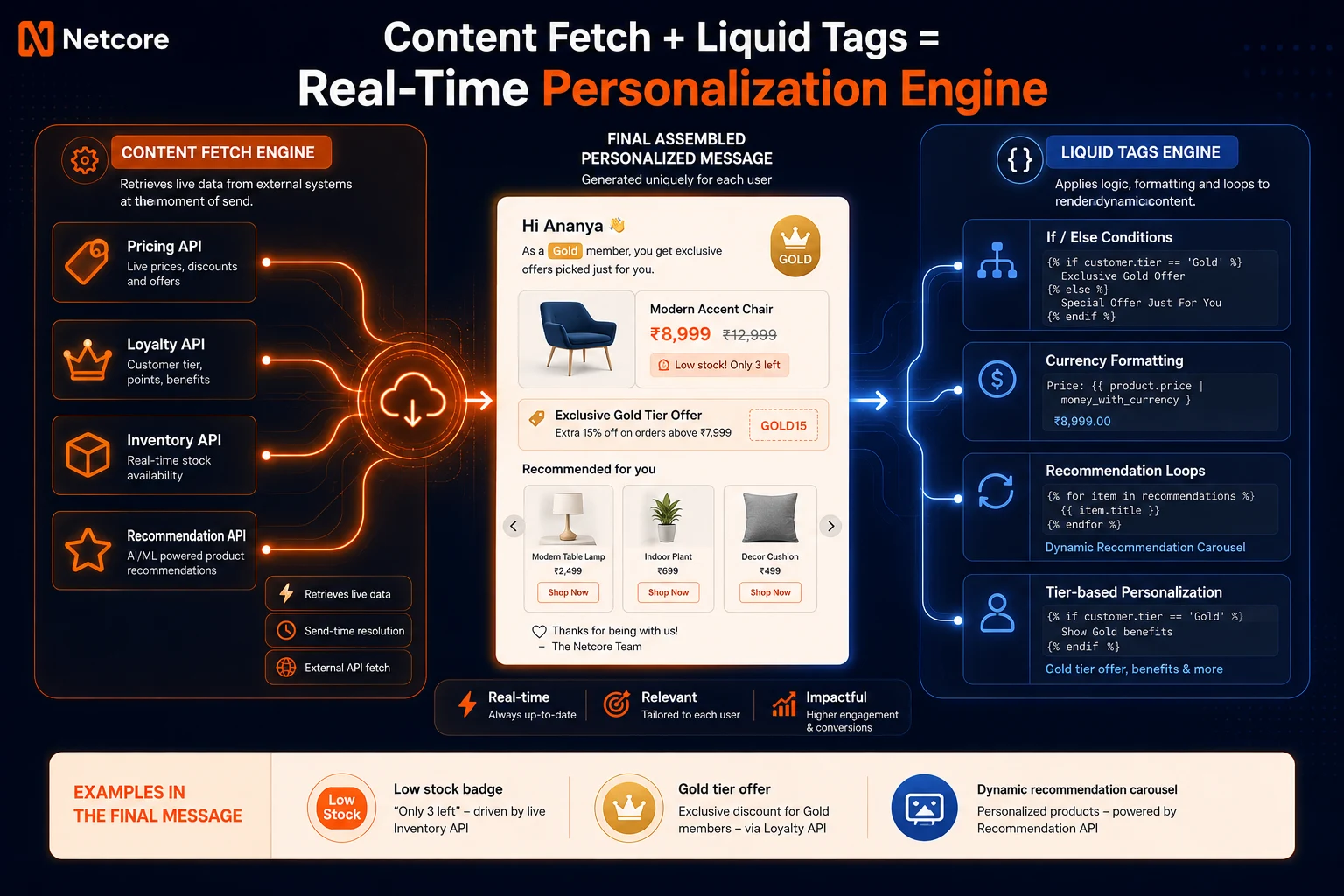
Content Fetch’s job is getting fresh data into your message. Liquid Tags’ job is deciding what to do with it — formatting it, adding logic, showing the right content block.
A few examples of the two working together:
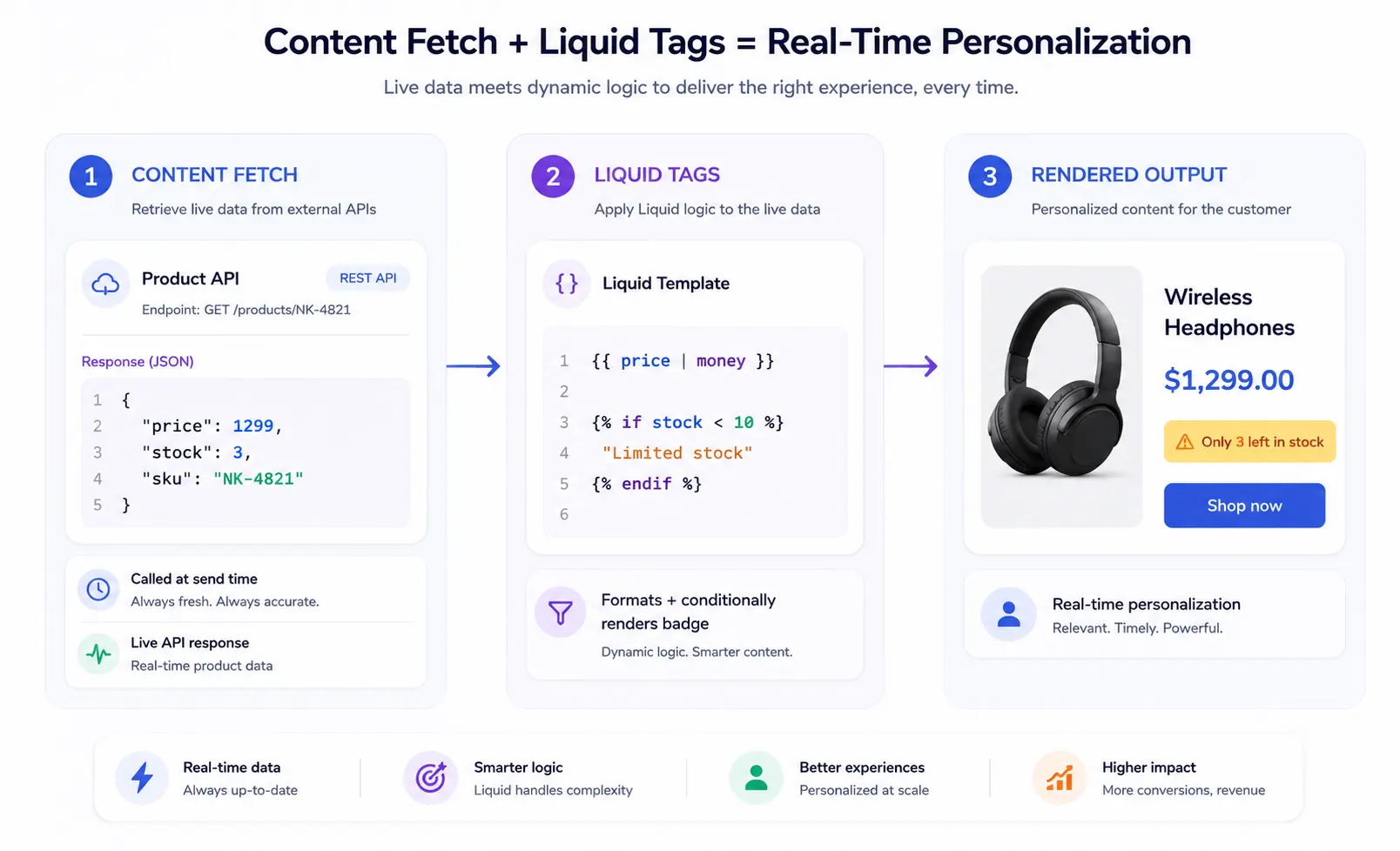
- Content Fetch pulls a live price → Liquid Tags adds the currency symbol and shows a “Limited stock!” badge if inventory is low
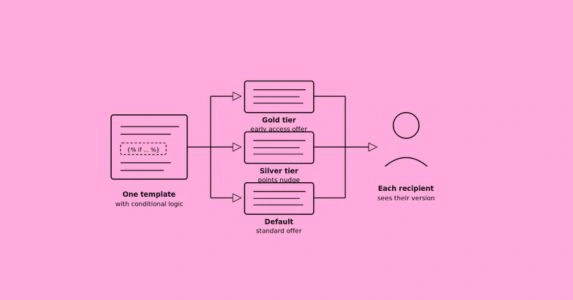
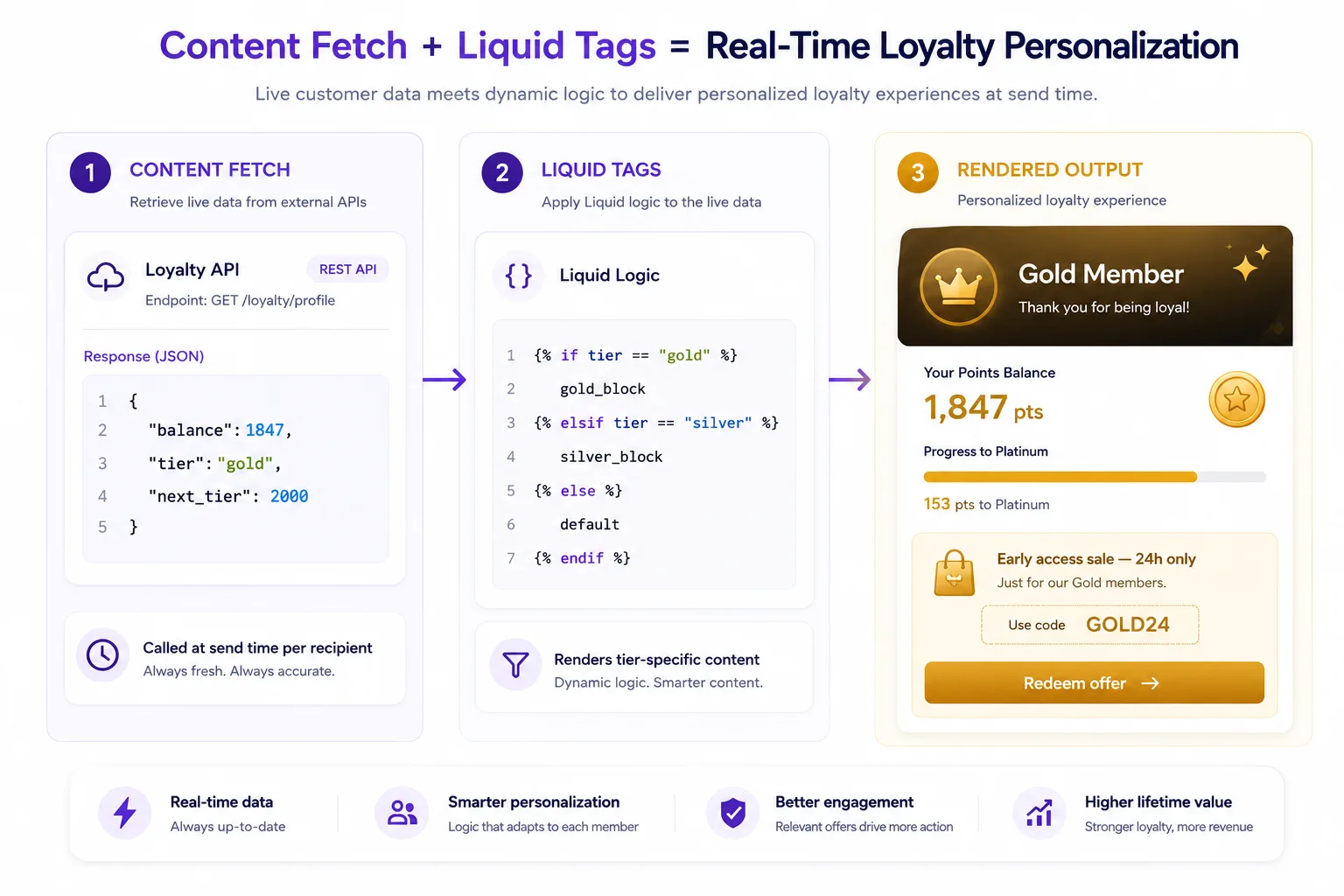
- Content Fetch pulls a loyalty balance → Liquid Tags decides which offer block to show based on that balance
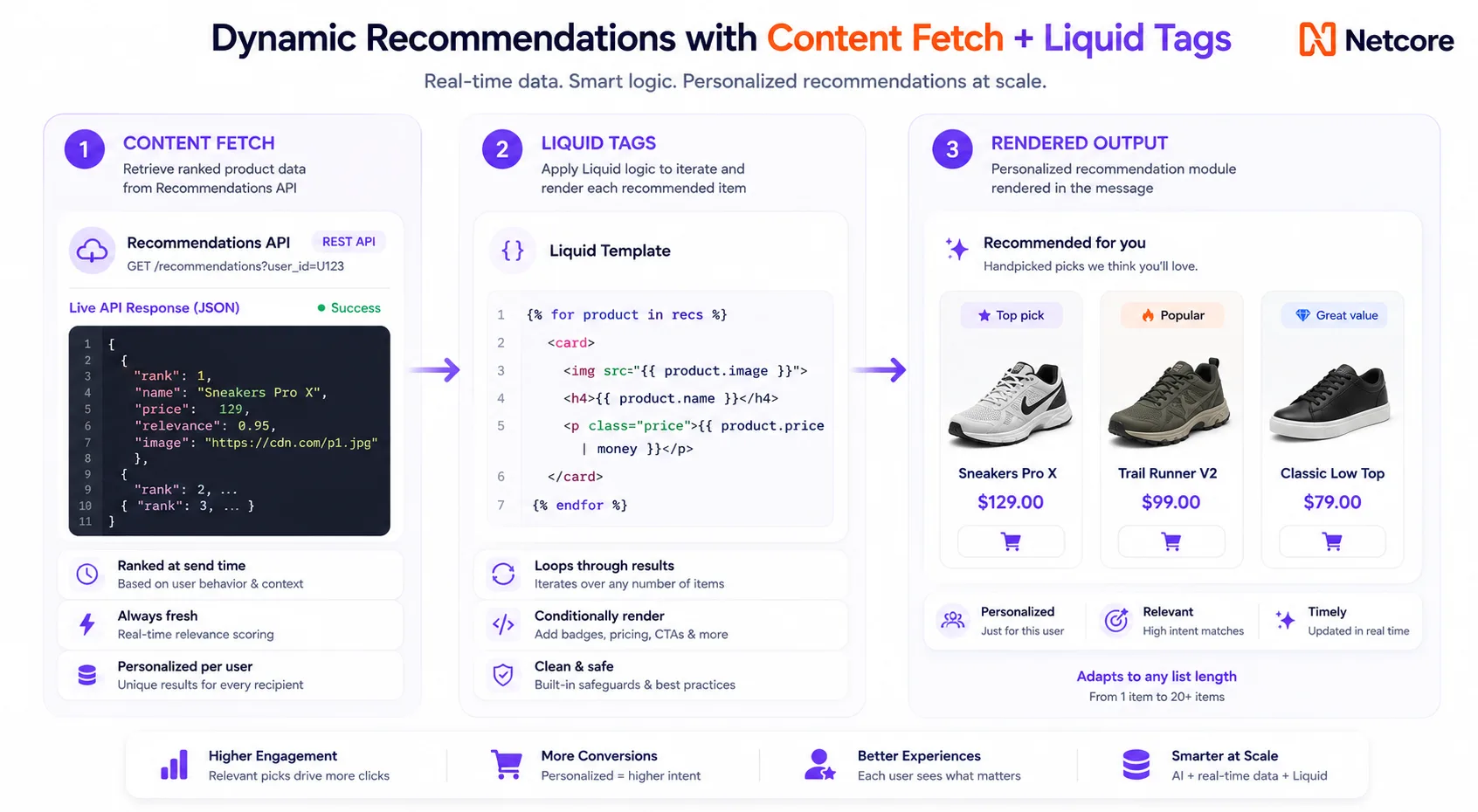
- Content Fetch returns a list of recommended products → Liquid Tags lays them out in the email
You don’t need both to use either — but together, they’re what lets one single template send a genuinely different, genuinely accurate message to every person on your list.
You Don’t Need to Code: Meet Co-Marketer AI
Here’s the part marketers will actually love: you don’t need to touch code to use any of this.
Liquid (the logic behind the personalization) has traditionally required engineering help to write. Co-Marketer removes that barrier entirely. Just describe what you want in plain English, and it writes the logic for you.
You type: “Show a renewal reminder if the subscription expires in less than 7 days”
You get: A ready-to-use snippet, correctly written, with a sensible fallback already built in — just drop it into your template.
Co-Marketer also has two built-in safety habits:
- It always asks about the fallback — what should show if the data isn’t there? This is what stops you from ever sending a broken email with blank fields.
- It keeps personal data safe — no personally identifiable information is ever exposed while you’re building, so your compliance team stays happy too.
The result: marketers can build sophisticated, data-driven emails without writing a single line of code — and that code is checked for safety before it ever reaches your customers.
How Netcore Stacks Up
| Netcore | Braze | MoEngage | Clevertap | |
| Templating Language | Liquid | Liquid | Jinja | Liquid |
| Live Data at Send Time | Content Fetch | Connected Content | Content APIs | Linked Content |
| Building It Without Code | Co-Marketer (AI-assisted) | Manual code | No-code builder | Manual code |
| Included with Personalization | Yes, native | Available | Advanced Plan only | Available |
| What Happens If Data Fails | Automatic fallback + built-in safety nets | You have to define it yourself | You have to define it yourself | Not specified |
Other platforms either make you write and test the logic by hand, or give you a no-code builder that trades away flexibility. Netcore gives you both: the full power of Liquid, an AI that writes it for you, and reliability guardrails that make it safe to run on your most important sends.
Where to Start
You don’t need to connect everything on day one. The easiest path:
- Start with loyalty or account data. It’s usually an internal system your team already controls, the payoff is immediate, and you’ll see a clear difference versus your old static emails.
- Add live pricing or stock next. Great for retail. If you’re in hospitality or content, live availability works the same way.
- Layer in weather or location once the basics are working. This is the natural next step if your brand runs seasonal or regional campaigns.
Each one adds value on its own — you don’t need to do all three to see results. Start with one, measure the difference, then expand.
The Bottom Line
Content Fetch doesn’t change how you build a campaign — it changes when the data inside it becomes real. That one shift turns every email from a snapshot of the past into something that’s actually true the moment it lands.
It’s reliable enough to trust with your biggest sends. It’s simple enough that you don’t need a developer to use it. And the payoff — accurate prices, real balances, real availability — is the kind of personalization that actually earns attention.
Start with one connection. Measure the difference. Then build from there.