TL;DR
- Every on-site search and category view tells you what a shopper wants right now. Most email platforms never see it.
- Bring on-site search and email onto one platform, and searches, category browsing, and empty results flow into every email and push.
- Five ways to use it: build audiences from intent, follow up on abandoned searches and browses, win the first purchase with smarter triggers, put personal picks in newsletters, and recommend what shoppers were actually looking for.
- AI agents get sharper with this data too: they know what to send, and when to wait.
- New York & Company saw a 1,228% ROI once every search began shaping its emails and SMS.
A shopper searches your site for a wedding guest dress, adds one to their cart, and leaves. That isn’t a lost sale; it’s a roadmap of exactly what they want.
By unifying your on-site search data with your ESP, you can replace generic blast promotions with hyper-relevant emails and push notifications based on their exact browsing affinity. When that shopper clicks back, your website dynamically adapts to their real-time interests. It creates a seamless feedback loop where shoppers easily find exactly what they want, and you capture the revenue. Here is how that works in practice
Your Product Discovery Data Knows What Shoppers Want. Your Emails Don’t.
Your email platform sees opens, clicks, and orders. Your on-site search solution sees what comes before: what shoppers type, the category pages they browse, the products they open, the searches that come back empty, and what’s in stock. Bring both onto one consolidated solution, and it all flows into every email and push.
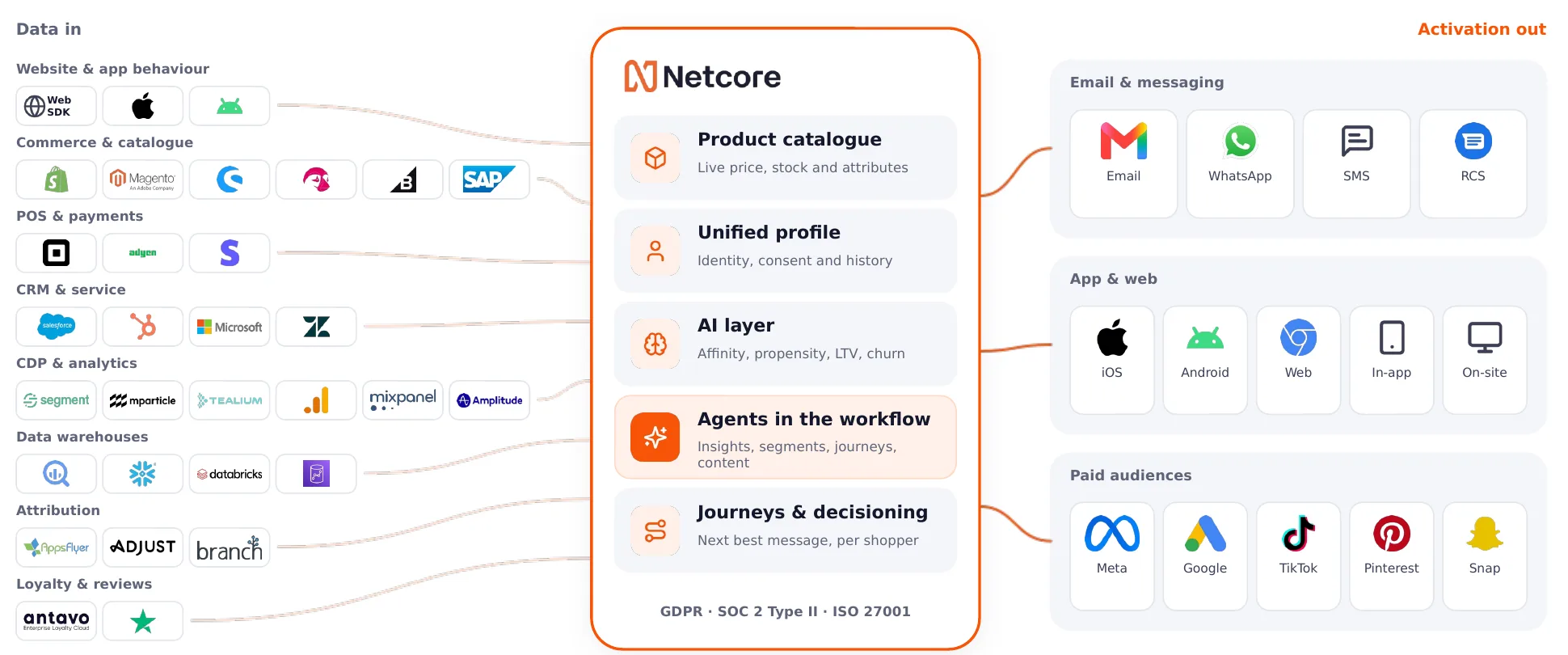
A view of Netcore’s wide channel breadth that works in tandem with virtually all data sources.
Your AI Is Only as Smart as What It Can See
AI agents can pick products, choose the channel, and decide whether to send at all. But they only know what you show them. Gartner predicts that through 2026, organizations will abandon 60% of AI projects that lack AI-ready data.
Marketing data tells an agent how a shopper behaves. Data from your on-site search solution, covering both what shoppers search for and the categories they browse, tells it what they want right now. Combine the two, and it knows what to send and when.
Say a shopper browses your trail running category and views three pairs of waterproof trail shoes between $100 and $140. An agent checks stock, past purchases, and when they open email, then picks: a comparison email, a close alternative, or nothing at all.
An agent can simply build segments from the searches, category browsing, engagement, and stock, while another agent can spot rising demand before sales do. That’s agentic marketing done right: an extra pair of hands that knows when to reach out and when to wait.
Five Ways to Put It to Work
Every email platform has automated flows, but none of them see what the shopper searched for or browsed before the flow began. Add that, and the same flow sends a very different email.
1. Build Audiences From What Shoppers Search For and Browse
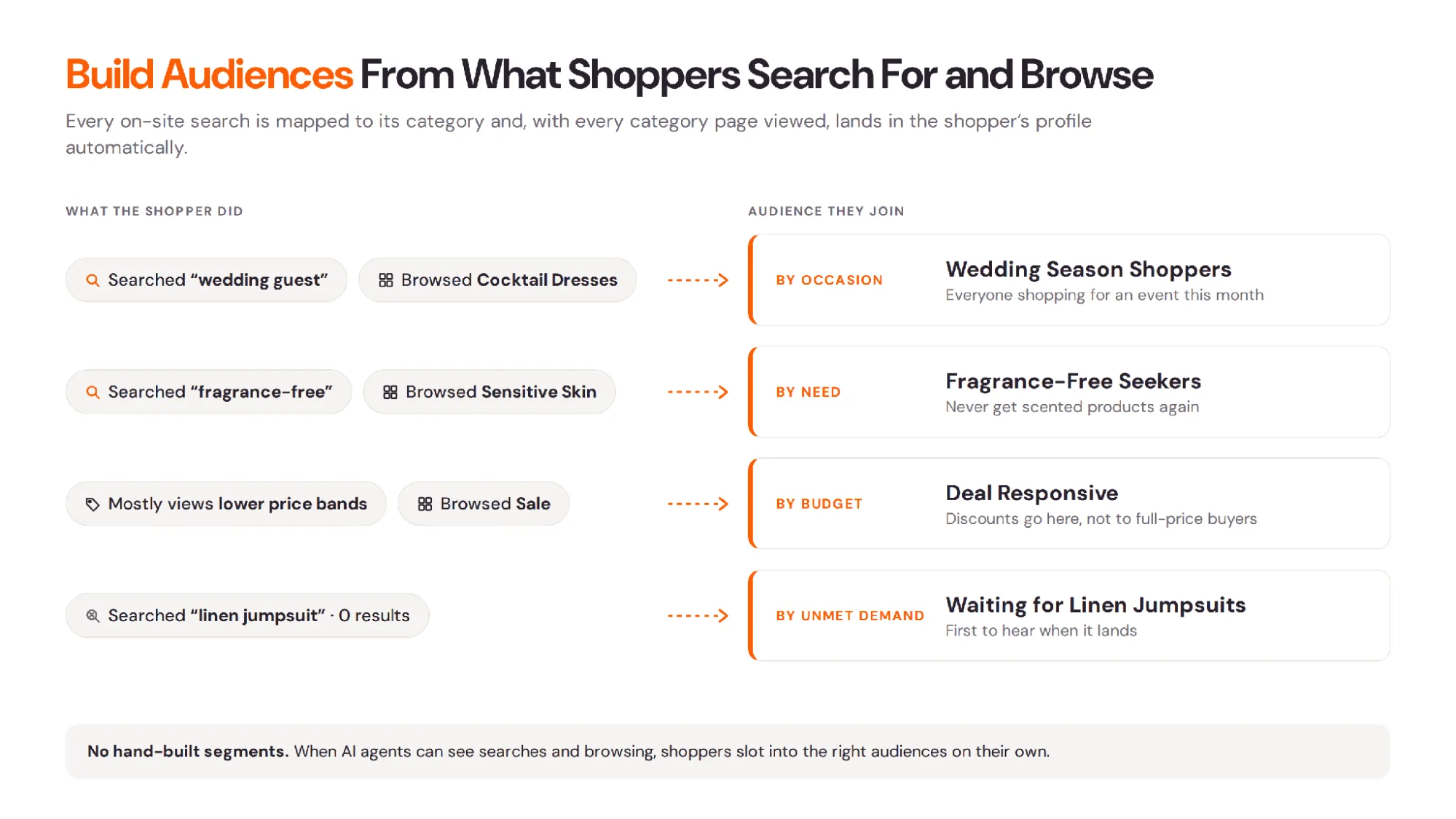
You already segment by purchases, clicks, and demographics. On-site search and category browsing add what shoppers want now. Searches are the deepest intent signal, and browsing is the most common one, so use both.
- By occasion. Everyone who searched “wedding guest” or “beach vacation” this month, or browsed your cocktail dresses or swimwear category.
- By need. Shoppers who searched “fragrance-free” or browsed your sensitive skin category.
- By budget. Shoppers who mostly view products in your lower price bands or browse your sale category, so discounts go to them, not to full-price buyers.
- By unmet demand. Shoppers whose searches came back empty, waiting for you to stock what they asked for.
No data work needed: each search is mapped to its broader category and, along with every category page a shopper views, lands in their profile automatically.
Did you know? When your AI agents can see what people search for and browse, shoppers slot into the right audiences on their own, with no hand-built segments.
2. Follow Up When a Search or Browse Doesn’t End in a Sale
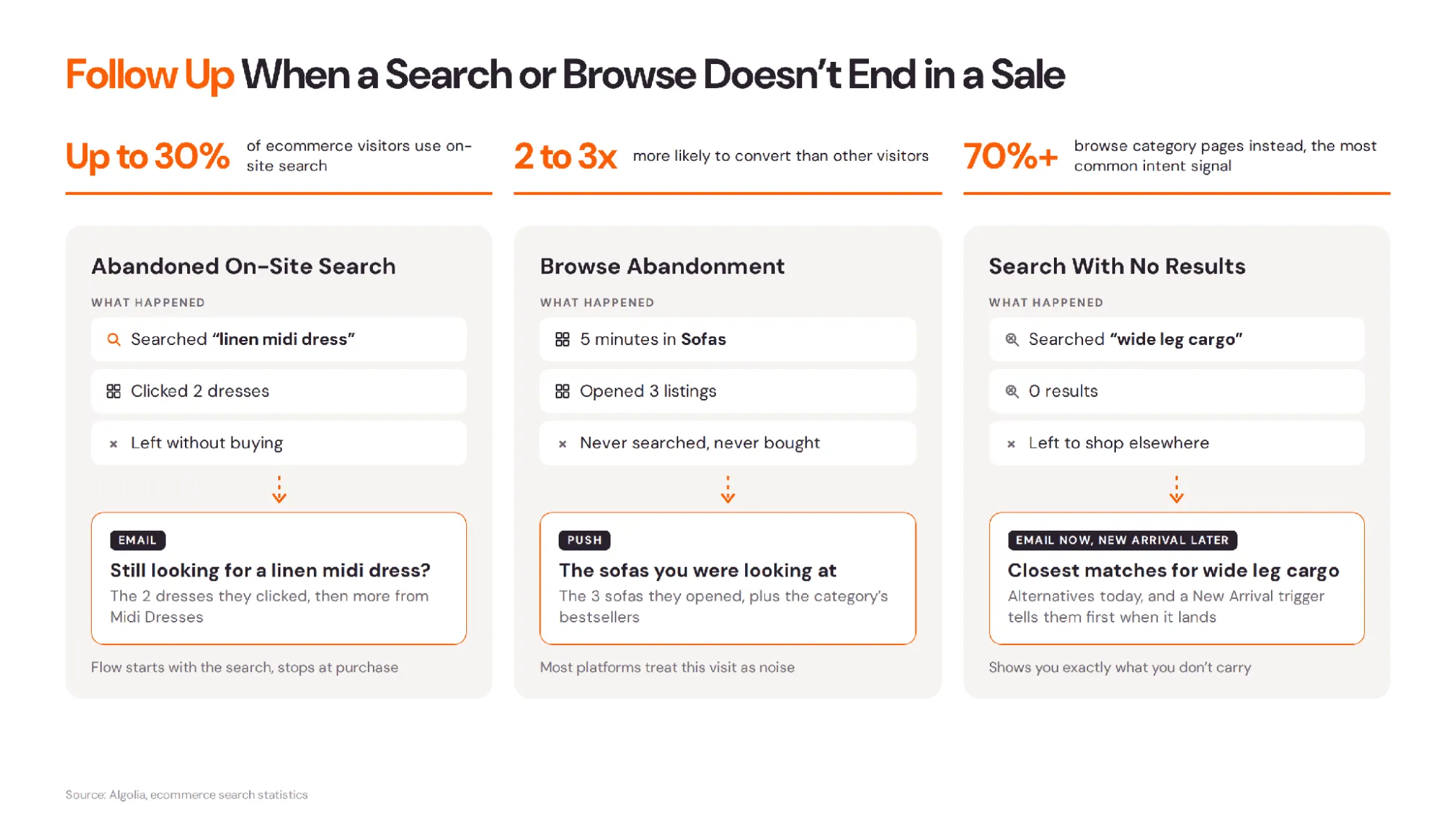
Up to 30% of ecommerce visitors use on-site search, and they’re 2 to 3 times more likely to convert. The other 70% or more browse your category pages instead, which makes browsing the most common intent signal on your site. When either kind of shopper leaves empty-handed, you lose a warm lead, and most email platforms never notice.
In Netcore, an abandoned search works like an abandoned cart: the flow starts with the search and stops at purchase. The follow-up leads with the products they clicked and fills in with others from the same category. Even the subject line speaks their language: “Still looking for a linen midi dress?”
Browse abandonment. A shopper spends five minutes in your sofas category, opens three listings, and leaves without searching once. Most platforms treat that visit as noise. Netcore follows up by email or push with the sofas they opened, plus the category’s bestsellers.
Searches that come back empty show you exactly what shoppers want that you don’t carry. Offer the closest alternatives now, and let a New Arrival trigger tell them first when it lands.
3. Win the First Purchase
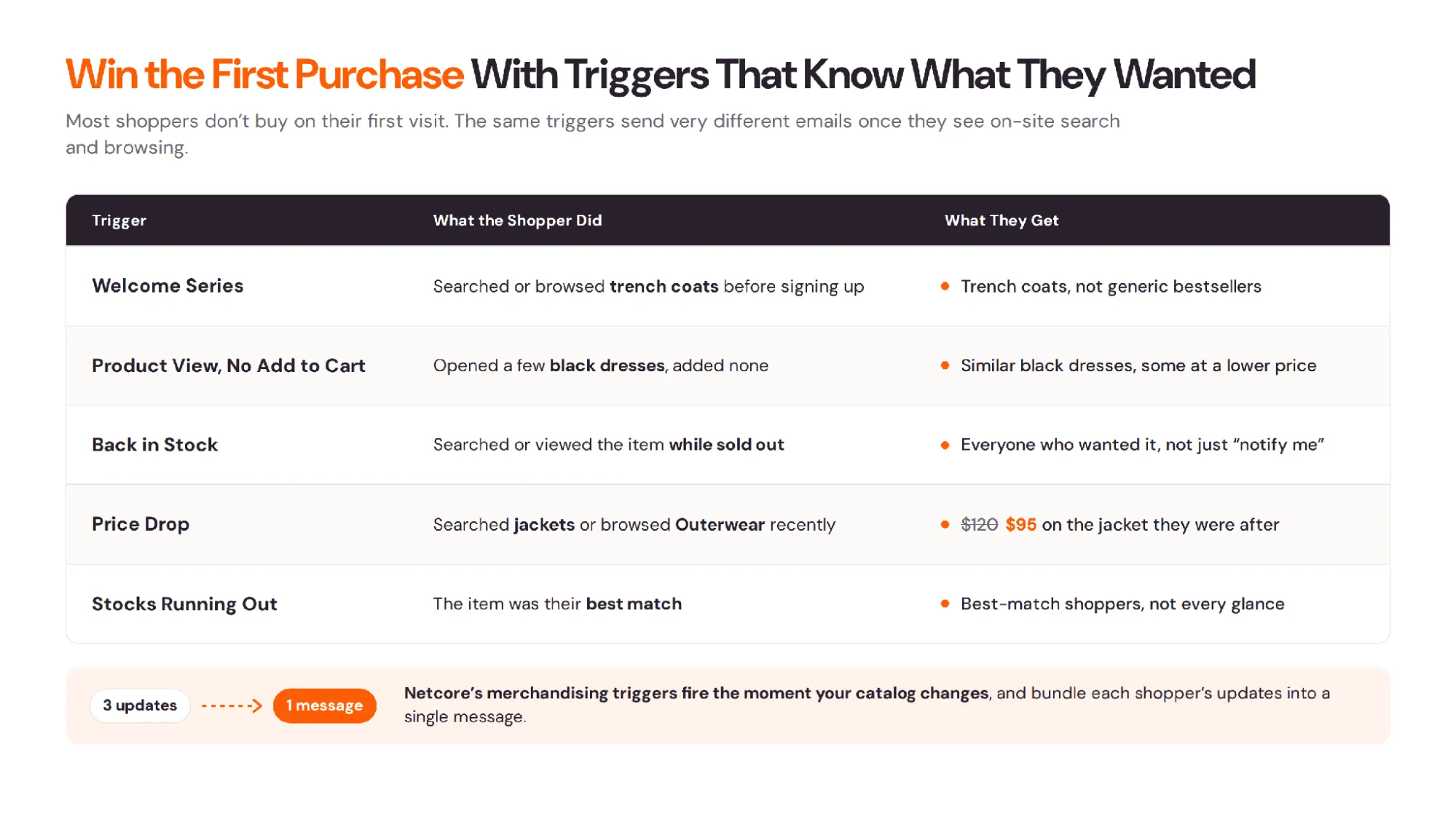
Most shoppers don’t buy on their first visit. Here’s what changes when your triggers know what they searched for and browsed.
Welcome series. A subscriber who searched for or browsed trench coats before signing up gets trench coats, not bestsellers.
Product View with no Add to Cart. They browsed black dresses and opened a few without adding any. Show similar black dresses, including some at a lower price point.
Back in Stock. Alert everyone who searched for it or viewed it while it was sold out, not just those who clicked “notify me.”
Price Drop. When a $120 jacket drops to $95, alert everyone who recently searched for jackets or browsed your outerwear category.
Stocks Running Out. Alert the shoppers it was the best match for, not everyone who glanced at it.
Netcore’s merchandising triggers fire the moment your catalog changes, and bundle a shopper’s updates into one message.
4. Put Personal Picks in Every Newsletter
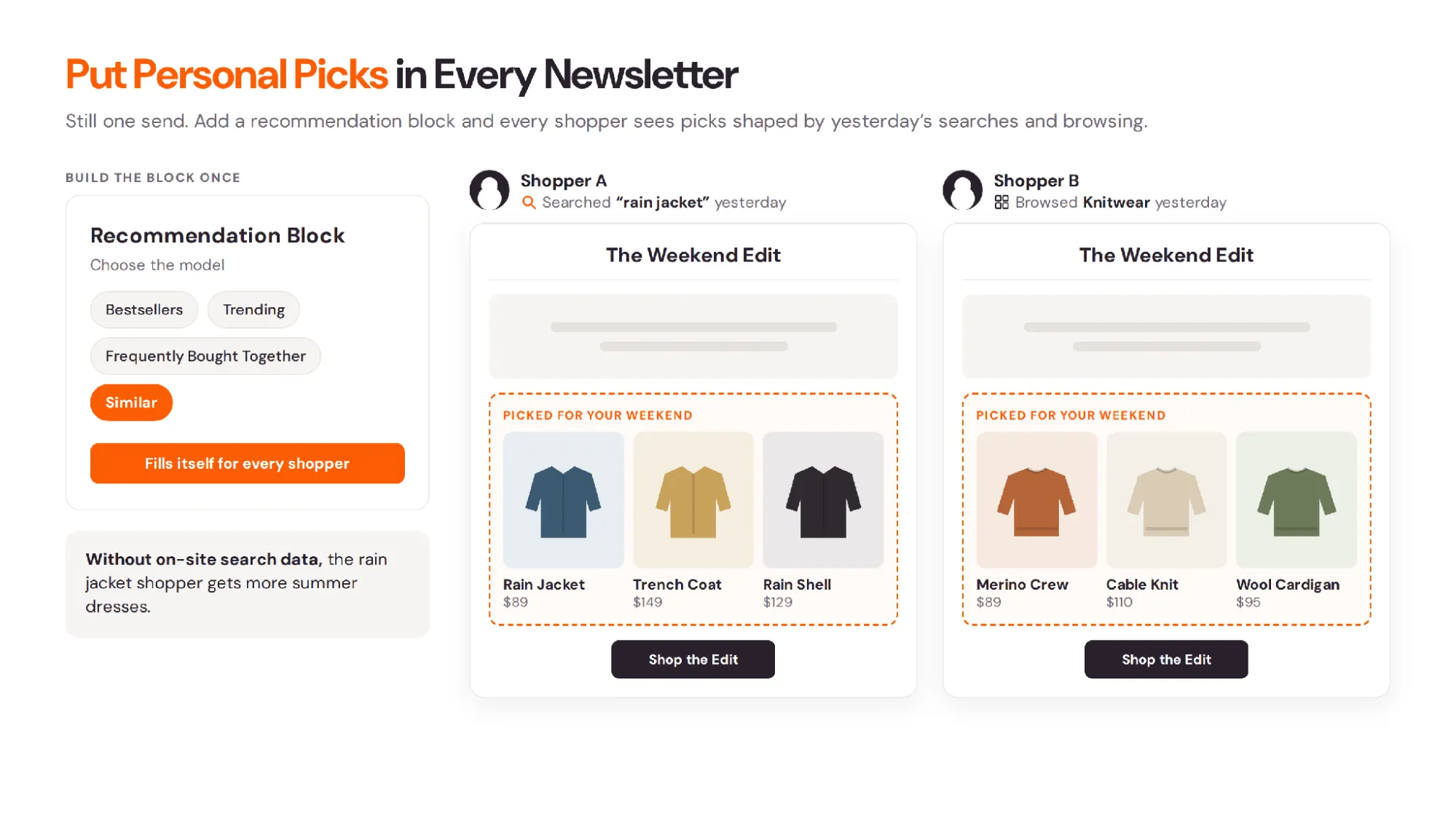
Newsletters go to everyone. Add a recommendation block, and it’s still one send, but every shopper sees their own picks.
On-site search and browsing make those picks timely: someone who searched “rain jacket” or browsed your outerwear category yesterday sees jackets in the weekend edit, not more summer dresses.
Build the block once, choose the model (bestsellers, trending, frequently bought together, or similar), and it fills itself for every shopper.
5. Recommend What Shoppers Were Actually Looking For
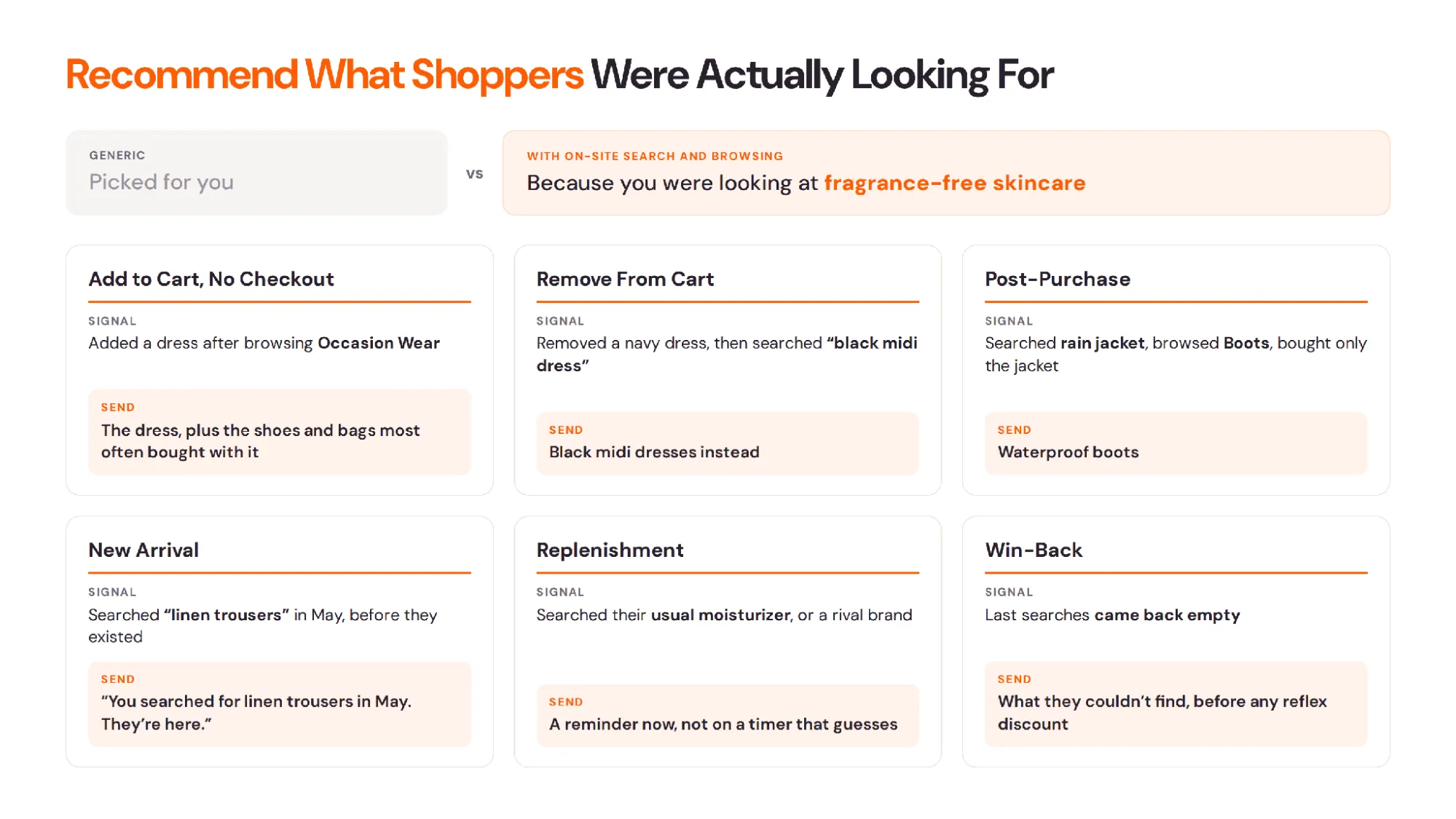
Searches and category visits reveal what shoppers were really trying to do. Someone who searched for fragrance-free moisturizer or browsed your sensitive skin category shouldn’t get scented ones, and the email can say why: “Because you were looking at fragrance-free skincare.” That beats “picked for you.”
Add to Cart with no Checkout. They added a dress to their cart after browsing your occasion wear category. Remind them of the dress, and show the shoes and bags most often bought with it.
Remove from Cart. They removed a navy dress, then searched “black midi dress.” Show black midi dresses instead.
Post-purchase. They searched for a rain jacket and browsed your boots category, but bought only the jacket. Send waterproof boots.
New Arrival. Tell the shoppers who asked before it existed: “You searched for linen trousers in May. They’re here.”
Replenishment. A timed reminder guesses. A search for their usual moisturizer or a rival brand, or a return visit to that category, says it’s time now.
Win-back. Skip the reflex discount. Check what a lapsed customer last searched for or browsed, and whether their searches came back empty. That may be why they left.
On Netcore, the same recommendations power your campaigns and flows, reading each shopper’s cart, purchases, views, searches, and category browsing.
Why Marketers Are Moving On-Site Search and Email Onto One Platform
It works the other way, too. Click a workwear email, then search “trousers,” and your on-site search shows tailored trousers, not joggers. Every response makes it smarter.
Fewer tools mean less spend, and Gartner reports that marketers use only 49% of what their martech can do. But the real question is whether your tools agree on what a shopper wants, what’s in stock, and whether they already bought. If not, every tool and AI agent works from half the picture.
Older email platforms were built to send campaigns, not read catalogs. Connecting them takes feeds, integrations, and weeks of engineering, and they still get a search term, not the products the shopper saw.
Shoppers expect better: McKinsey found that 71% of consumers expect personalization, and 76% get frustrated without it. For New York & Company, every search began shaping the emails and SMS that followed, for a 1,228% ROI.
On Netcore, on-site search, recommendations, and AI shopping experiences share one shopper profile with email, SMS, WhatsApp, and push, with your team and AI agents working from the same picture.
Want to see what your shoppers’ searches and browsing could improve? Book a 30-minute audit. We’ll review them alongside your campaigns and show you where you’re leaving sales on the table.