


Picture a scenario every B2B revenue team knows too well.
Your sales team spends three months working a prime enterprise account. Early calls go great, but mid-funnel, the deal stalls. The buyer stops replying, the deal gets marked as Dormant, and your sales team moves on.
A month later, that executive quietly re-engages.
They click a link in a marketing newsletter, check out your pricing page, read a case study, and review your security docs. They aren’t just browsing; they are actively evaluating your product to buy. Netcore captures every single one of these signals in real time.Meanwhile, in Zoho CRM, your sales rep sees none of this. The account still looks completely dead. Assuming nothing has changed, the rep spends their time cold-calling other leads.
Days pass. The prospect expects a timely follow-up. When nobody reaches out, they assume your team doesn’t care and buy from a competitor who called at the right moment. The deal wasn’t lost because of bad fit or lack of interest. It was lost because sales and marketing were looking at two completely different pictures.
When Your Systems Don’t Talk, Your Customers Fall Through the Cracks
This disconnect isn’t an isolated mishap; it is a daily reality for growing businesses. Your CRM holds the official relationship history: deal stages, contract values, lifecycle statuses, and sales notes. Meanwhile, your marketing platform tracks the live pulse of the customer: email engagement, site behavior, content consumption, and campaign interactions.
When these two worlds operate in isolation, critical context gets lost in the handoff. Marketing operates with one eye closed, building campaigns off static lists and accidentally emailing leads who are already deep in sales talks. Sales works completely in the dark, spending hours cold-calling without knowing which prospects are active on the site. Ultimately, the customer experiences a fractured story with a business that feels disjointed.
To bridge this gap, businesses usually fall back on painful workarounds:
- Manual CSV Exports: Exporting files from one tool and importing them into another on a cadence someone has to remember, delivering data that is stale before it even uploads.
- Custom Middleware: Tying up internal engineering resources to write custom webhooks and API scripts that are expensive to build and brittle to maintain.
- Complex CRM Workflow Rules: Configuring webhooks and basic-auth headers manually inside the CRM for every single module, creating an ongoing maintenance burden.
We built a much simpler, native way to solve this.
Meet the Native Zoho × Netcore Connection
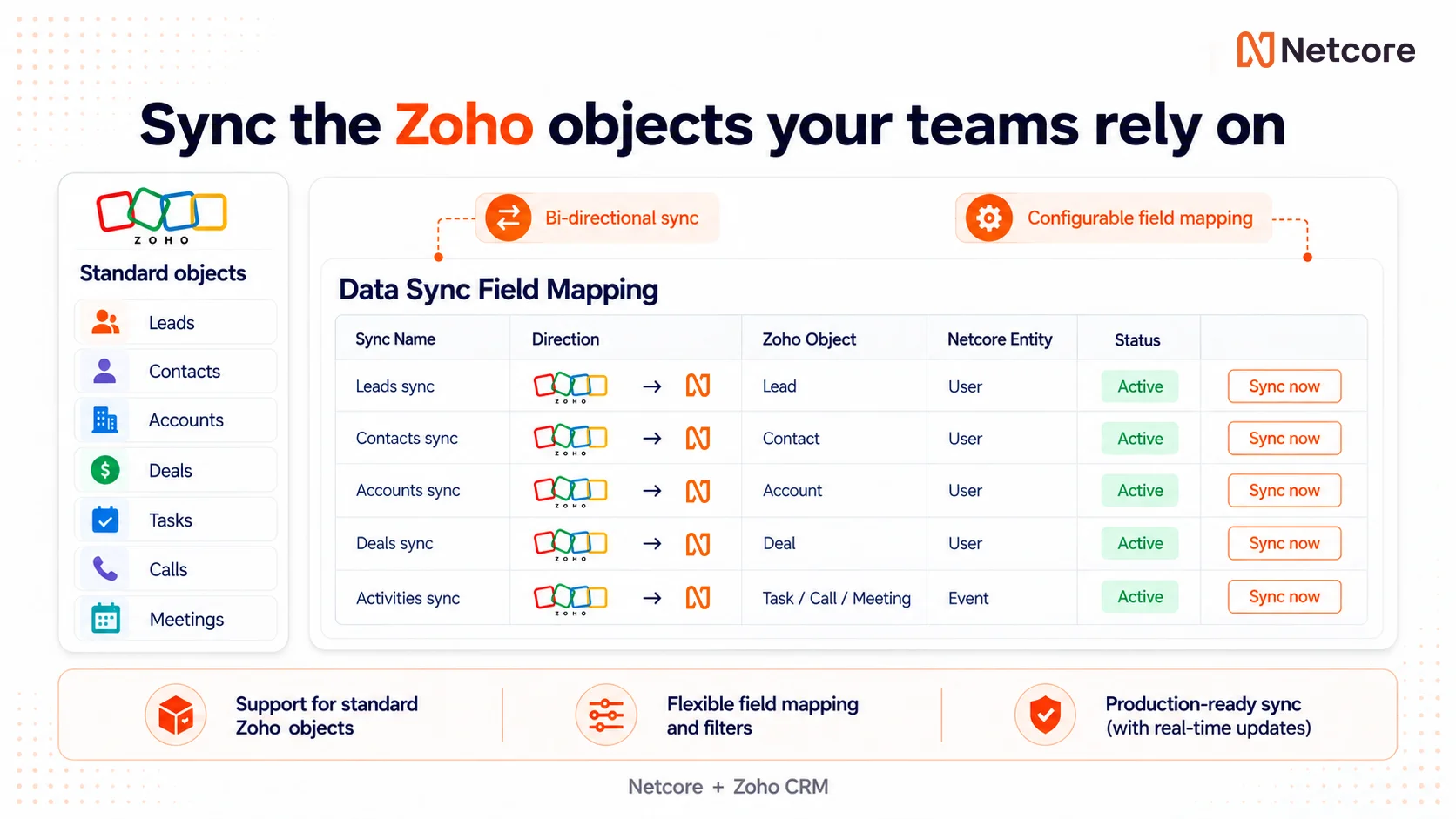
Today, we are launching the bi-directional Zoho CRM × Netcore integration: a native data bridge designed to unite customer context with real-time behavioral execution.
Configured entirely within Netcore in under 15 minutes, this connector establishes a secure channel that passes key details back and forth automatically, requiring zero workflow rules, custom code, or webhooks inside Zoho:
- Zoho → Netcore: Sync Leads, Contacts, Accounts, Deals, Tasks, Calls, Meetings, and custom modules directly into Netcore as Contacts or Events to power context-aware segmentation and journeys.
- Netcore → Zoho: Export real-time behavioral and engagement events from Netcore straight into Zoho CRM as actionable Tasks, Calls, or Meetings attached directly to the matching record.
For Marketing: Campaigns Backed by Deep CRM Context
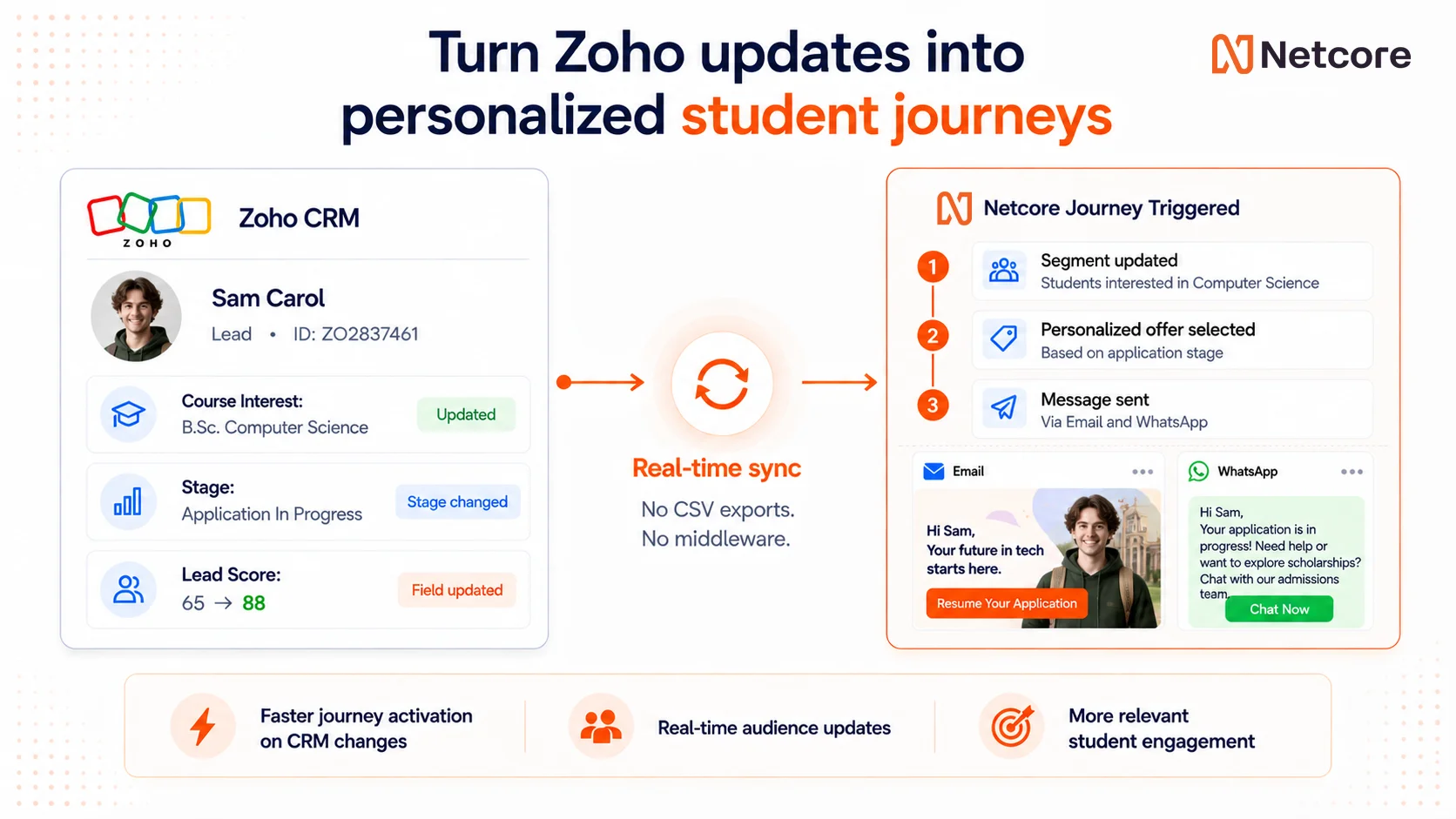
Great marketing isn’t just about tracking opens and clicks; it’s about honoring the total customer relationship. By streaming Zoho CRM details straight into Netcore, your campaigns gain the real-world business context they’ve been missing.
You can combine real-time engagement metrics with CRM firmographics, such as industry, annual revenue, account type, lead source, and record owner, to build precision segments. Leads can be entered automatically into nurture journeys the moment their score or stage progresses inside Zoho. If a deal moves to Closed Lost, Netcore can immediately trigger a win-back journey tailored to the specific loss reason.
Because data syncs continuously, campaign entry and exit rules react instantly to sales updates, keeping your messaging perfectly aligned with where the buyer stands today. You can even backfill historic Contacts from Zoho on day one so your campaigns launch with complete depth rather than a blank slate.
For Sales: Turn Buying Signals into Actionable CRM Work
Marketing activity shouldn’t stay trapped inside an analytics dashboard. It should give your sales team an immediate, natural reason to reach out. With this integration, high-intent actions captured inside Netcore are pushed straight into your reps’ daily workspace as native Zoho activities.
- Alert reps to high-intent behavior: When a prospect demonstrates high-value cart abandonment or repeatedly views pricing pages, Netcore automatically creates an actionable Task or Call in Zoho against the matching Lead or Contact.
- Close the loop on campaign engagement: When a prospect clicks a campaign CTA or responds to a WhatsApp message, a follow-up Task or callback activity is generated instantly so reps can strike while intent is fresh.
- Capture appointments seamlessly: Appointments booked within Netcore automatically create a Zoho Meeting on the matching Contact with start and end times clearly logged.
- Flag account-level risk: Renewal-risk signals captured in Netcore generate immediate Tasks against affected Accounts in Zoho CRM for the account owner.
Built Safe by Construction
Connecting your revenue stack shouldn’t introduce data chaos. We built this connector with strict guardrails to protect the integrity of your CRM. Netcore maps behavioral events strictly to existing records. If no record matches, or if multiple records match, the activity is safely logged without altering your database.
The connector never creates new Leads, Contacts, or Accounts in Zoho CRM, preventing system clutter and duplicate records. Additionally, repeated event deliveries are automatically deduplicated. With full support across global Zoho data centers (.com, .in, .eu, .com.au, .jp, .ca), your team maintains complete compliance with local data-residency standards.
Simple 3-Step Setup: No Tech Team Required
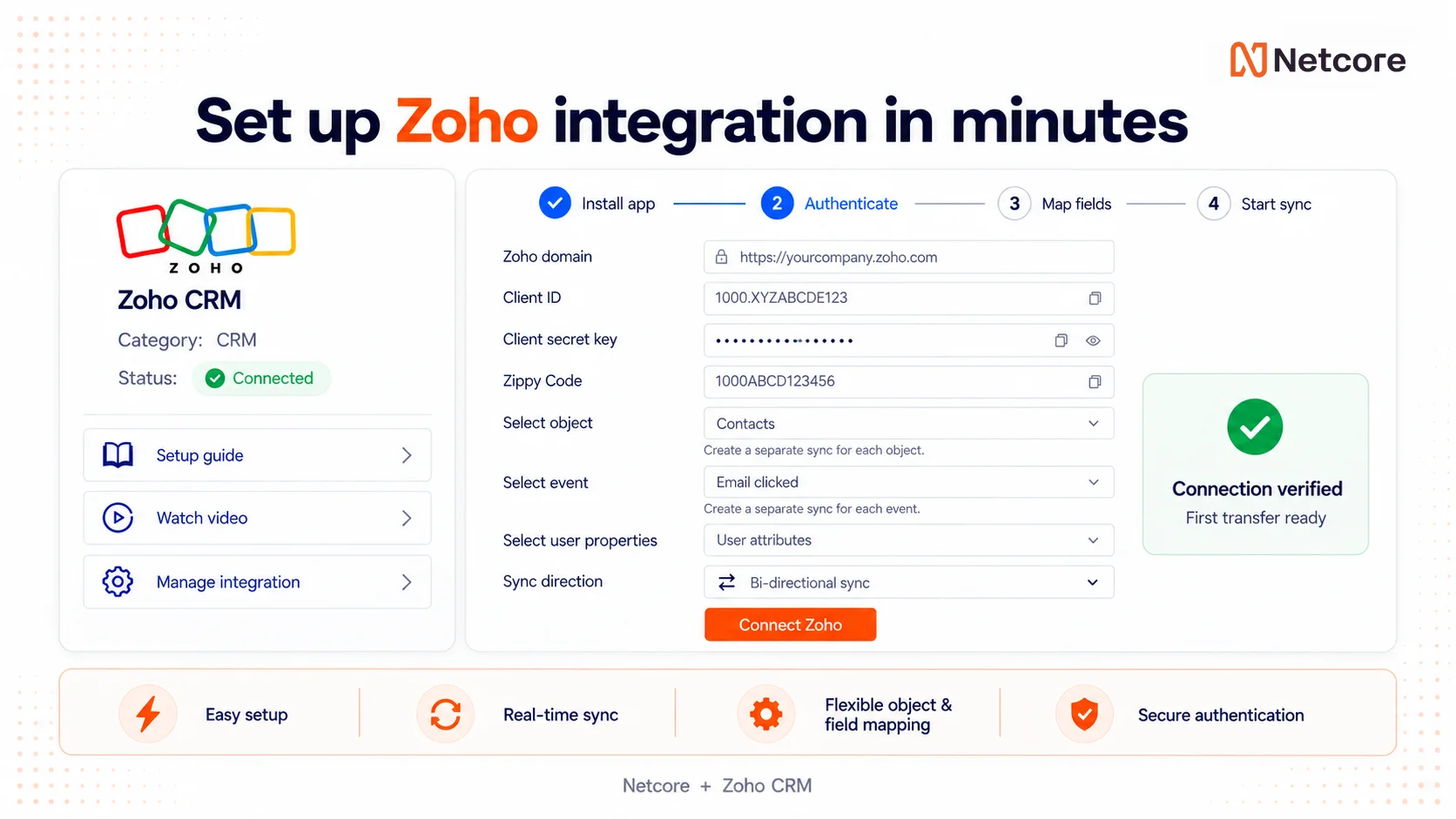
Connecting your tools shouldn’t feel like a massive engineering project. You can activate and configure the integration natively within Netcore in just three straightforward steps:
- Connect & Authorize: Select your Zoho data center in Netcore’s Integrations 2.0 framework and authorize via OAuth. Netcore runs an automated test call to verify permissions before activating the connection.
- Select Direction & Modules: Choose your data flow. For Inbound, select your Zoho module and map it to Netcore Contacts or Events. For Outbound, choose a Netcore behavioral trigger, assign the destination Zoho activity (Task, Call, or Meeting), and select the parent record type.
- Map, Filter, & Test: Map custom attributes, apply filters so only relevant events transfer, and run a single-record test against real data with full payload visibility before switching the sync to live.
One Complete View of Your Customer
The best customer experiences happen when everyone works from the exact same narrative. Marketing captures digital momentum; Sales carries the human relationship forward.
That prospect who spent time evaluating your solution platform shouldn’t have to wait for a weekly report or a manual file export. The signal is already there. Now, it goes straight to the person equipped to close the deal.
Ready to connect your revenue engine?
Connect Zoho CRM with Netcore today and turn quiet buyer signals into your next closed deal.


